1
Background removal
Praised by several users for accurate cutouts, especially on logos and clipart.
Pixelcut AI is an image and video editing tool focused on upscaling, background removal, and AI generation, but reviews highlight aggressive billing, opaque limits, and unreliable support that overshadow its occasional editing strengths.
Independent review — we test tools ourselves and analyze public user reviews. How we test.
Pixelcut AI can deliver good background removal, upscaling, and brush-based edits when it works, and some users genuinely like its free-tier capabilities. However, the dominant pattern across reviews is severe distrust around billing, trials, and credit consumption, combined with weak, often unresponsive support. Functional limits and video constraints are poorly disclosed, and several users report charges after cancellation or accidental purchases without refunds. This tool is only suitable for technically confident experimenters willing to stay strictly on the free plan and monitor charges closely, not for businesses or anyone risk-averse about subscriptions.
Pixelcut is an AI photo editor aimed at people who sell things online and need store-ready images without opening Photoshop. It started as a mobile app for product photography and has grown into a web studio used by a claimed tens of millions of creators.
The core job is turning a plain phone snapshot into something that looks shot in a studio. You upload a photo, and the tools handle background removal, object erasing, upscaling, and prompt-based edits like swapping a backdrop or recoloring a product.
What separates it from a generic editor is speed and a near-zero learning curve. Most actions finish in a couple of seconds with a single click, and the interface hides the technical settings a designer would normally adjust.
The catch sits in the pricing. A free account handles basic cutouts and small exports, but the AI generation, high-res downloads, prompt edits, and 4x upscaling run on a credit system that empties fast. New accounts start with 8 credits. Plan on paying if you use it daily.
Praised by several users for accurate cutouts, especially on logos and clipart.
Frequently noted as effective for logo and coloring page upscaling.
Highlighted positively for working better than some paid alternatives.
Heavily criticized for uneven quality and credit burn per generation.
Limited to short clips, with undisclosed constraints frustrating buyers.
Some reviewers find free quotas generous compared with competing tools.
Widely condemned as misleading, with unexpected annual charges.
Batch export caps and high resource usage received strong criticism.
Cross-device access exists, but iPhone generator selection is restricted.
I started with the feature Pixelcut built its name on. My test image was a portrait of a woman standing in a flower bed, hair loose and a crowded garden blurred behind her.
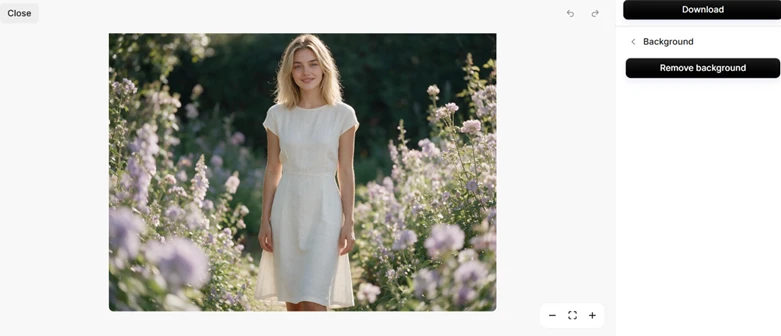
One click on Remove Background finished the job in about two seconds. To judge the cutout fairly, I switched the backdrop to solid black. Black exposes the rough edges and leftover halos that a white background quietly hides. The dress and arms came away clean, and the hair kept its natural shape instead of collapsing into a solid mass. I zoomed to the hairline to be sure.
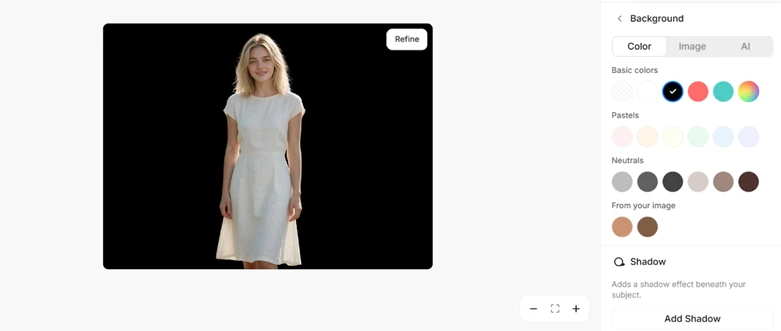
Then I pushed in on the strands themselves.

Individual hairs survived the cut, which is rare for a free tool that does no manual masking.
The first crack showed at download. Free accounts can save as JPEG or PNG, while WebP and SVG sit behind the PRO badge.
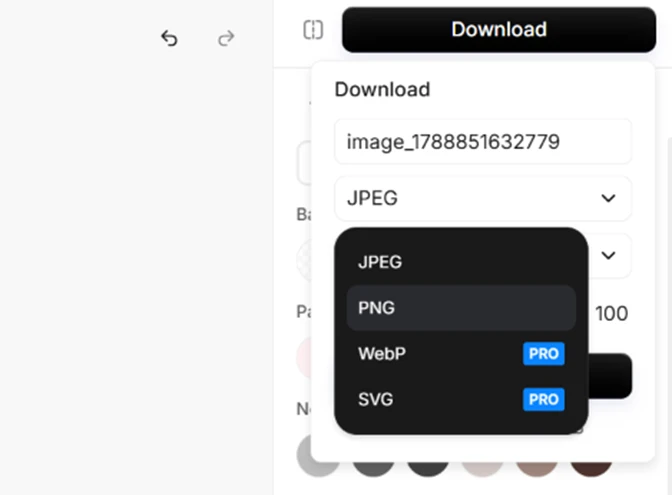
PNG covers most web use, so this limit stung less than what came next.
My new account opened with 8 credits. That figure decides how much of Pixelcut you actually get, because the AI models spend credits quickly. I typed a prompt for a photorealistic cyberpunk Tokyo street to see how far the balance would stretch.
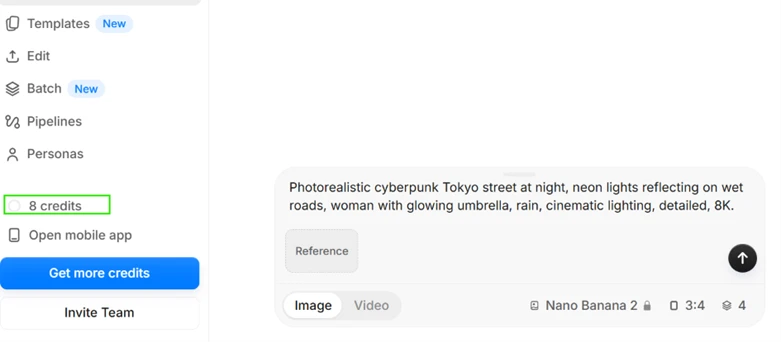
It did not stretch far.
Next I took the background-removed portrait into the edit-with-prompt tool and asked for a neon city backdrop with the dress recolored red.
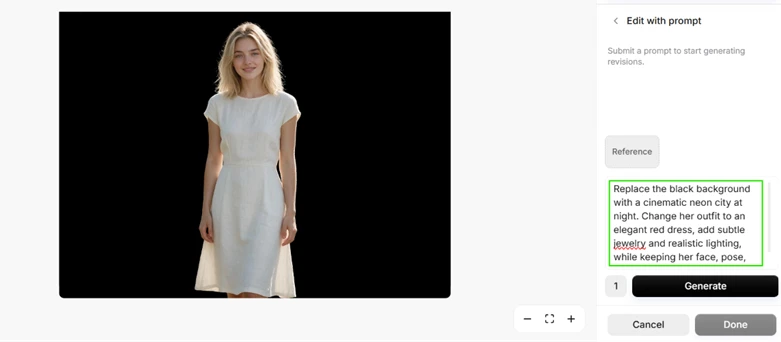
Pressing Generate produced no image. It opened the upgrade screen instead.
Pro lands at $8 a month and Business at $24 a month on annual billing, both higher month to month. These are the dollar prices a US reader meets at checkout.
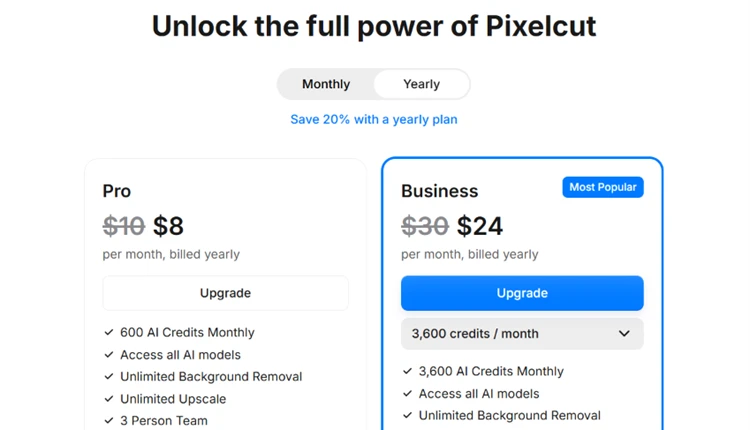
The plan list settles what “free” means here. The unlimited background removal and upscaling both live on the paid tiers. The free plan is a sample of them.
For the last test I uploaded a deliberately blurred 500 by 375 photo of a camel.
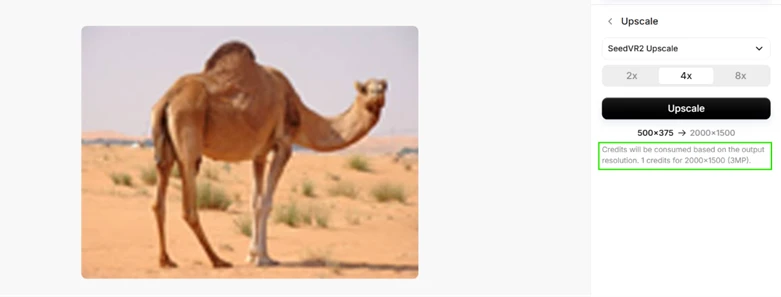
The panel laid out the cost plainly. 2x runs on the free path, while 4x to 2000 by 1500 takes a credit for every image. I ran the 2x.

The output pulled most of the blur out and recovered honest texture in the fur and the sand. At full zoom the thin background grass goes a little soft. For a free pass on a low-resolution source, I would ship this result. The editing engine is strong. The paywall shows up early and often.
| Dimension | Our test | User signal | Verdict | Composite |
|---|---|---|---|---|
| Output Quality Accuracy and visual results | 9 | 8.5 | Excellent | |
| Ease of Use Learning curve and workflow | 8 | 8 | Good | |
| Pricing Transparency Clarity of costs and limits | 6.5 | 6 | Moderate | |
| Billing Reliability Accuracy of charges | 6.5 | 6.5 | Moderate | |
| Customer Support Helpfulness and speed | 6 | 6.5 | Moderate | |
| Performance and Stability Speed and technical reliability | 9 | 8 | Excellent | |
| Value for Money Perceived return on spend | 7 | 8.3 | Good |
Toolscopia uses cookies to keep you signed in, remember your preferences, and understand how our reviews get read. Analytics are anonymous. See our privacy policy for the full detail.






Comments 0
Join the discussion and share your perspective.
Sign in to post a comment and reply to other readers.
No comments yet
Be the first to share your perspective on this tool.