1
100+ tools in one place
Image, video, face swap, audio, and editing under one account.
Pixnova AI is an all-in-one creative studio with 100+ tools for AI images, face swap, video, and photo editing. It hands new users 120 free credits, though a dual-credit system and high per-task costs drain them fast.
Independent review — we test tools ourselves and analyze public user reviews. How we test.
Pixnova AI lands at a combined 7.3 out of 10, a genuinely capable generator held back by a confusing, fast-draining free economy. The output is the reason to try it: a text-to-image landscape came back fully photorealistic, and a face swap blended an uploaded face into a new scene cleanly, without the pasted-on look most free swappers produce. It runs 100+ tools under named operators, and the 120-credit welcome bonus looks generous at first glance. The friction is all in the credits. A single image costs 20 to 65 credits, so the free balance is gone in two or three generations, and video runs on a separate "yellow credit" currency at 100 per second, which puts it out of reach for free users entirely. Strong results, stingy and opaque access.
Pixnova AI is a browser-based, all-in-one AI creative platform. Rather than doing one job, it bundles more than 100 tools under a single account, covering AI image generation, face swap, video, audio, and a set of photo-editing utilities.
The image side runs multiple models, including a GPT Image 2.5 generator with resolution and aspect-ratio controls. Face swap takes a source image and a face image and merges them. The video side is powered by a single model, Seedance 2.5, offering 480p and 720p output. Alongside these sit tools like a clothes changer, hairstyle changer, and headshot generator.
New accounts receive 120 credits on sign-up, with no card required. Beyond that, usage runs on credits priced per task: image generations cost roughly 20 to 65 credits each depending on settings, while video is billed in a separate "yellow credit" currency at 100 per second. Paid plans run from Basic at $16.90 a month through Plus at $29.90 to Pro at $59.90, plus a Pay-as-You-Go option.
The service is operated by named companies rather than an anonymous outfit, which gives it more accountability than many rivals in this crowded space.
Image, video, face swap, audio, and editing under one account.
Text-to-image with 1K/2K/4K resolution and aspect-ratio control.
Merges an uploaded face into a source scene.
Text-to-video at 480p and 720p.
Clothes changer, hairstyle changer, headshot generator, and more.
Pixnova AI bundles more than 100 creative tools under one account, from image generation to face swap and video. We put the main ones through real jobs on the free plan, judging each result by eye, and watched closely to see how far the 120-credit welcome balance actually stretches.
Signing in drops 120 credits into the account straight away, framed as points to claim and spend.

On the surface that is a friendly start, no card required. How far it goes is a different question, and one the rest of the test answers.
The face swap tool takes two uploads, a source image that supplies the scene and a face image that supplies the identity, then merges them.
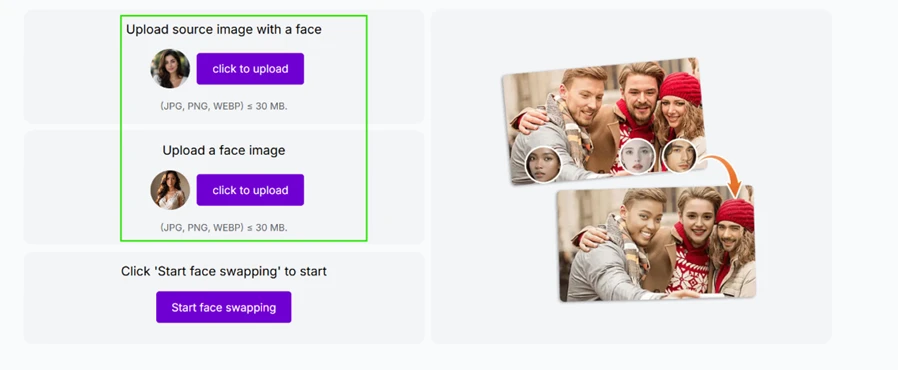
We uploaded our own two images, the source scene on the left and the face to swap in on the right.
 |  |
The result is where Pixnova earns its score. The swapped face sat naturally in the new scene, with matched lighting and skin tone and none of the hard, pasted-on edges that give most free swappers away.

Next we ran the GPT Image 2.5 generator. Before it runs, it shows the price, and here the credit math starts to bite.
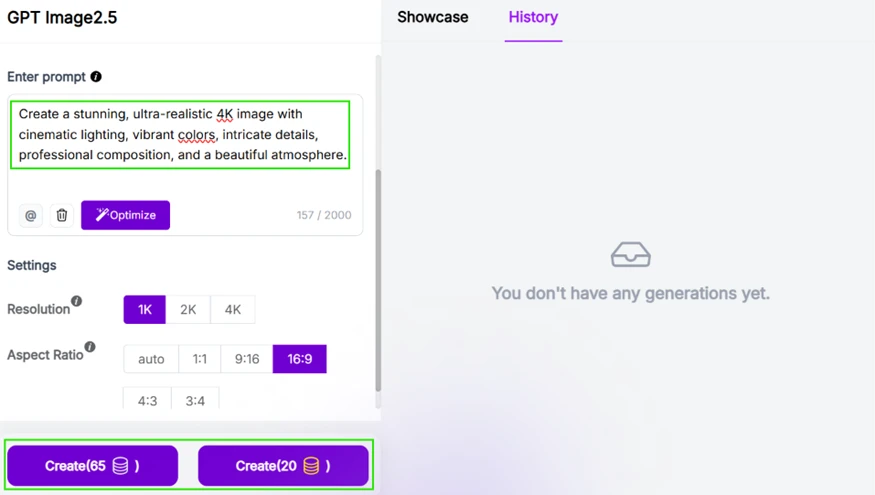
The output itself is excellent. A landscape prompt returned a fully photorealistic scene, a cabin above a lake at sunset, with convincing light, reflection, and depth and no visible AI artifacts.

The catch is the price. At 65 credits for a single high-setting image, the 120-credit welcome balance covers only two or three generations before it is gone. The quality is there; the free runway to enjoy it is short.
The video side is the weakest part of the offer, on two counts. First, despite the 100+ tools branding, text-to-video rests on a single engine, Seedance 2.5.
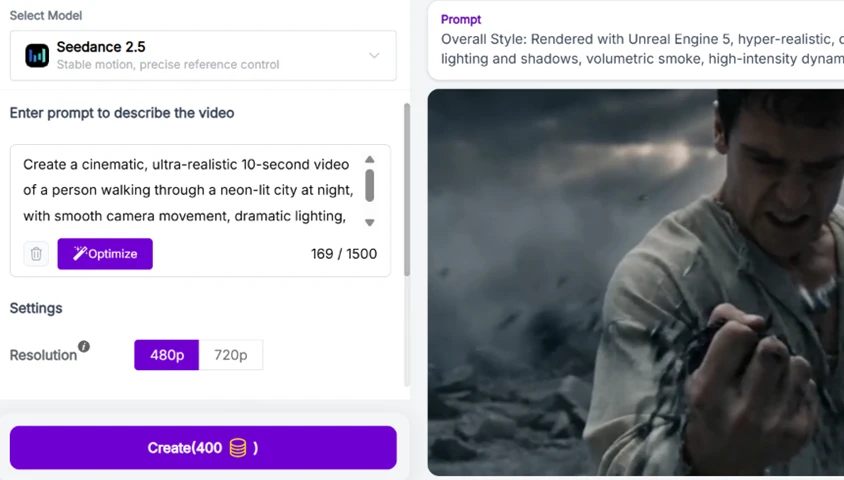
Second, and more important, video is billed in a separate currency. It costs 100 yellow credits per second, not the normal credits the welcome bonus is made of. A free user holding 120 normal credits cannot realistically produce a clip at all, which makes the headline video feature paid-only in practice.
The paid plans are laid out clearly, with a subscription and a Pay-as-You-Go option.
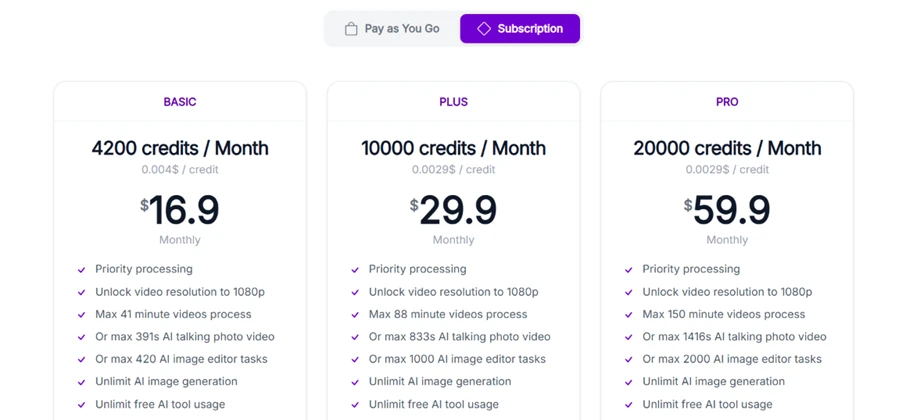
Subscriptions run Basic at $16.90 a month for 4,200 credits, Plus at $29.90 for 10,000, and Pro at $59.90 for 20,000, each adding priority processing, 1080p video, and higher task limits. Unlike many tools in this space, Pixnova is run by named operators rather than an anonymous brand, which is a point in its favour. The verdict in short: the results are genuinely good, but the dual-credit system and fast-draining free balance make the real cost harder to read than it should be.
| Dimension | Our test | User signal | Verdict | Composite |
|---|---|---|---|---|
| Image Quality How realistic and clean the output is | 9 | 9 | Excellent | |
| Face Swap Quality How naturally a swapped face blends in | 8 | 8 | Good | |
| Feature Breadth Range of tools, models, and modes | 8 | 7 | Good | |
| Free-Tier Value What the 120-credit balance actually gets | 5 | 5 | Weak | |
| Credit & Pricing Clarity How transparent the cost system is | 7 | 6 | Moderate | |
| Ease of Use How simple it is to go from prompt to result | 8 | 8 | Good |
Toolscopia uses cookies to keep you signed in, remember your preferences, and understand how our reviews get read. Analytics are anonymous. See our privacy policy for the full detail.






Comments 0
Join the discussion and share your perspective.
Sign in to post a comment and reply to other readers.
No comments yet
Be the first to share your perspective on this tool.