1
AI image generation
Generates images from prompts, sometimes praised as visually impressive but often criticized for poor adherence and distortions.
SeaArt AI is an online AI art and video generator pitched to creatives and hobbyists but dogged by aggressive billing, opaque subscriptions, censorship complaints, and unreliable support that often leaves paying users feeling exposed and unprotected.
Independent review — we test tools ourselves and analyze public user reviews. How we test.
SeaArt AI offers varied AI image and video generation tools that some casual users find fun and visually impressive. However, reviews describe extremely aggressive and confusing billing flows, frequent accidental annual charges, and a near-total refusal to refund, even when no credits are used. Many users report bugs, outages, censorship issues, hidden subscription controls, and support that feels automated and unresponsive. It suits only highly vigilant experimenters willing to treat it as a disposable playground, not anyone who needs predictable costs, stable service, or trustworthy policies.
SeaArt AI is a cloud-based, all-in-one AI art platform built on an aggregator model: instead of developing everything in-house, it hosts a library of hundreds of thousands of community models plus big third-party engines like Veo and Kling, all runnable from a browser with no GPU required. Beginners get an Easy Mode with prefilled prompt settings, while advanced users can build node-based ComfyUI workflows in the cloud. The toolkit spans image generation, short video clips, 4K upscaling, inpainting, face swap, and LoRA training that needs only 20 to 30 reference images, alongside a character chat section called Cyberpub.
It is one of the cheapest ways into serious AI art, with a free daily allowance and paid plans from $5.99 per month, and it particularly shines for anime and stylized work. The catch is complexity and trust: pricing mixes daily Stamina with purchased Credits in a system that confuses many users, billing and auto-renewal complaints are well documented, and the platform has faced accusations of copying models from CivitAI. Midjourney still wins on photorealism, so SeaArt fits volume-focused, budget-conscious creators best.
Generates images from prompts, sometimes praised as visually impressive but often criticized for poor adherence and distortions.
Creates short AI videos, widely reported as incoherent, frequently failing, and consuming large amounts of paid credits.
Heavily promoted three day trials, repeatedly criticized as traps that convert into expensive annual plans.
Tiered plans with stamina credits, viewed as confusing, unfairly changing, and not refunded when issues occur.
NSFW filtering that users describe as overzealous, inconsistent, and prone to flagging harmless content.
Chat and character features some users enjoy, though others mention censorship and discoverability problems.
Support channels mainly perceived as bot driven, unhelpful, and unresponsive during urgent billing problems.
Low cost promos like $0.09 or €0.08 trials, often followed by unexpectedly high yearly charges.
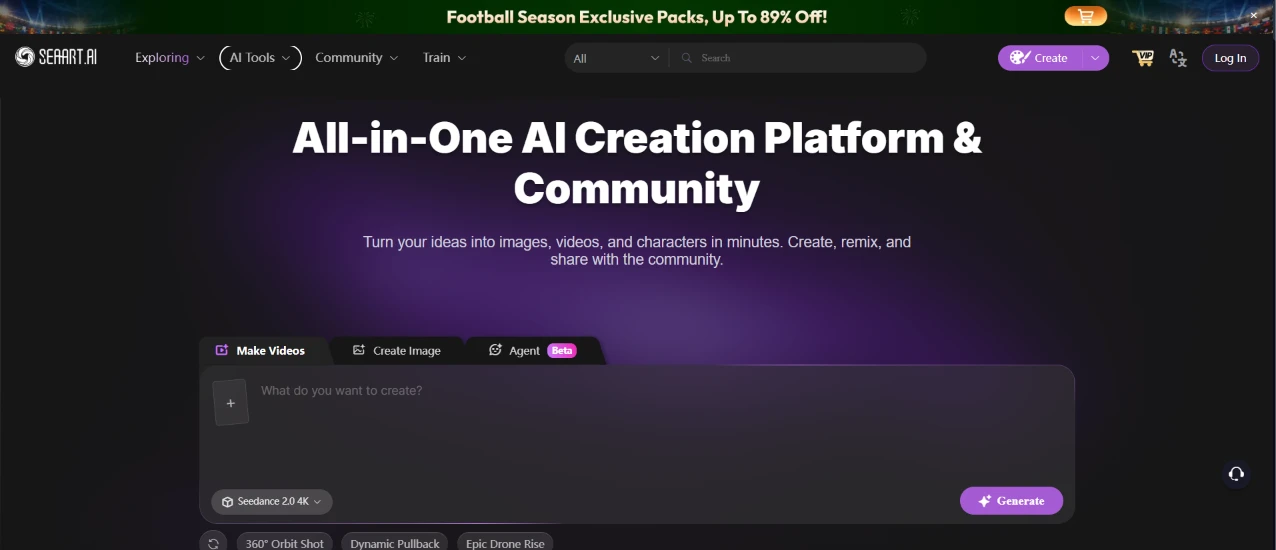
This is the first thing I saw, the SeaArt AI homepage before I signed in. I hadn't touched anything yet. The page led with a headline about being an all-in-one AI creation platform and community, and it put a creation box front and center with tabs for Make Videos and Create Image, plus an Agent option marked Beta. Below the box sat a model picker already set to Seedance 2.0 4K and a row of quick presets like 360° Orbit Shot and Dynamic Pullback.
The thing that jumped out before I did anything was the football promo banner running across the top, pushing packs at up to 89% off. The homepage was selling me something the moment it loaded.
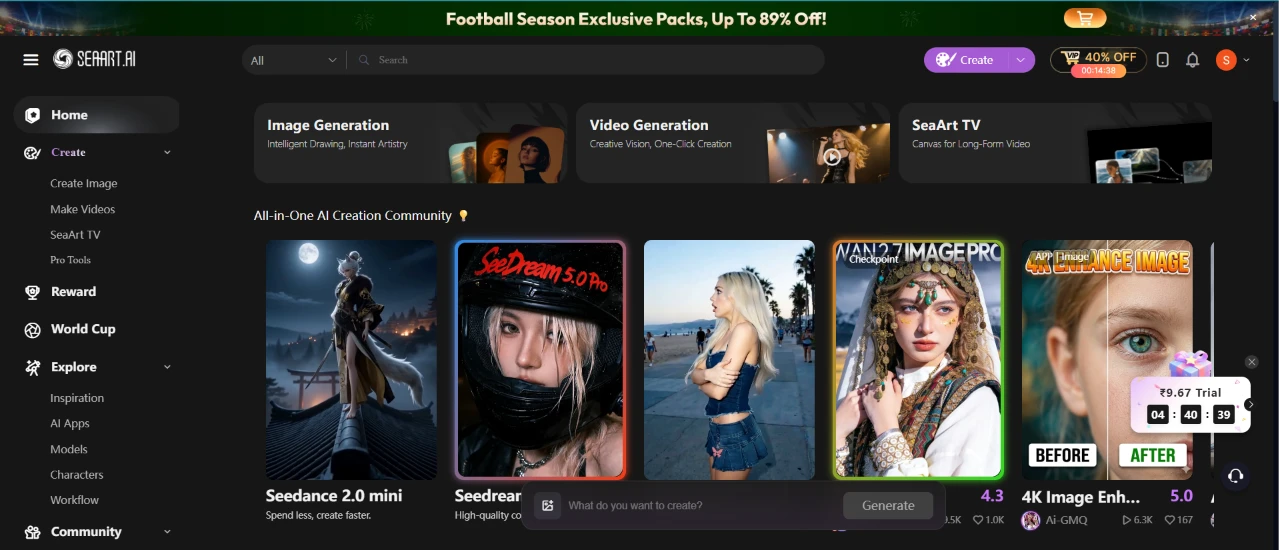
Once I logged in, the dashboard opened and got busy fast. A sidebar down the left carried the navigation, with Home, Create, Reward, World Cup, Explore, and Community stacked in a column. The middle of the screen led with feature cards for Image Generation and Video Generation, plus one for SeaArt TV, and under those a wall of community-made images took over most of the space.
The football banner was still up top, now with a 40% off tag near the Create button and a countdown widget flashing a trial price next to it. My eye kept drifting to the promos instead of the actual tools, and it took me a second to find where to start.
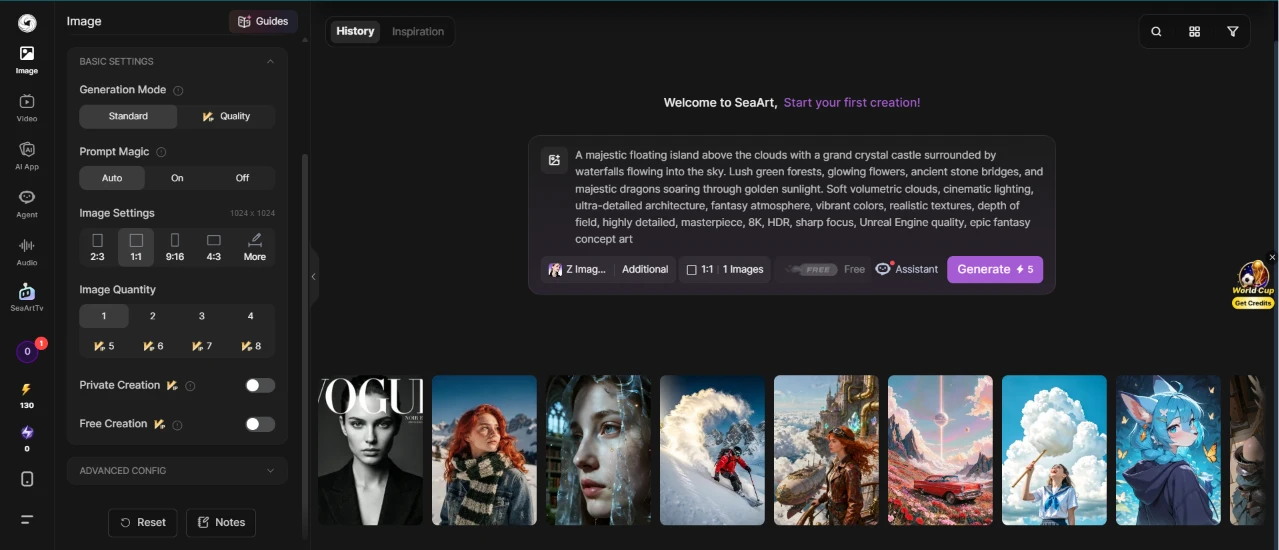
Here's where I set up my first image. I switched the generation mode to Standard instead of Quality, chose a 1:1 ratio, and dropped the image quantity to 1, all to spend as few credits as I could.
The prompt I fed it was a dense fantasy scene:
"A majestic floating island above the clouds with a grand crystal castle surrounded by waterfalls flowing into the sky. Lush green forests, glowing flowers, ancient stone bridges, and majestic dragons soaring through golden sunlight. Soft volumetric clouds, cinematic lighting, ultra-detailed architecture, fantasy atmosphere, vibrant colors, realistic textures, depth of field, highly detailed, masterpiece, 8K, HDR, sharp focus, Unreal Engine quality, epic fantasy concept art."
The settings panel earned some goodwill here. Generation mode, prompt magic, aspect ratio, and quantity each sat in their own labeled block, so I could see exactly what touched my credit count before committing. I also noticed the Generate button wore a Free tag, which was a relief after all the upsell banners on the way in.
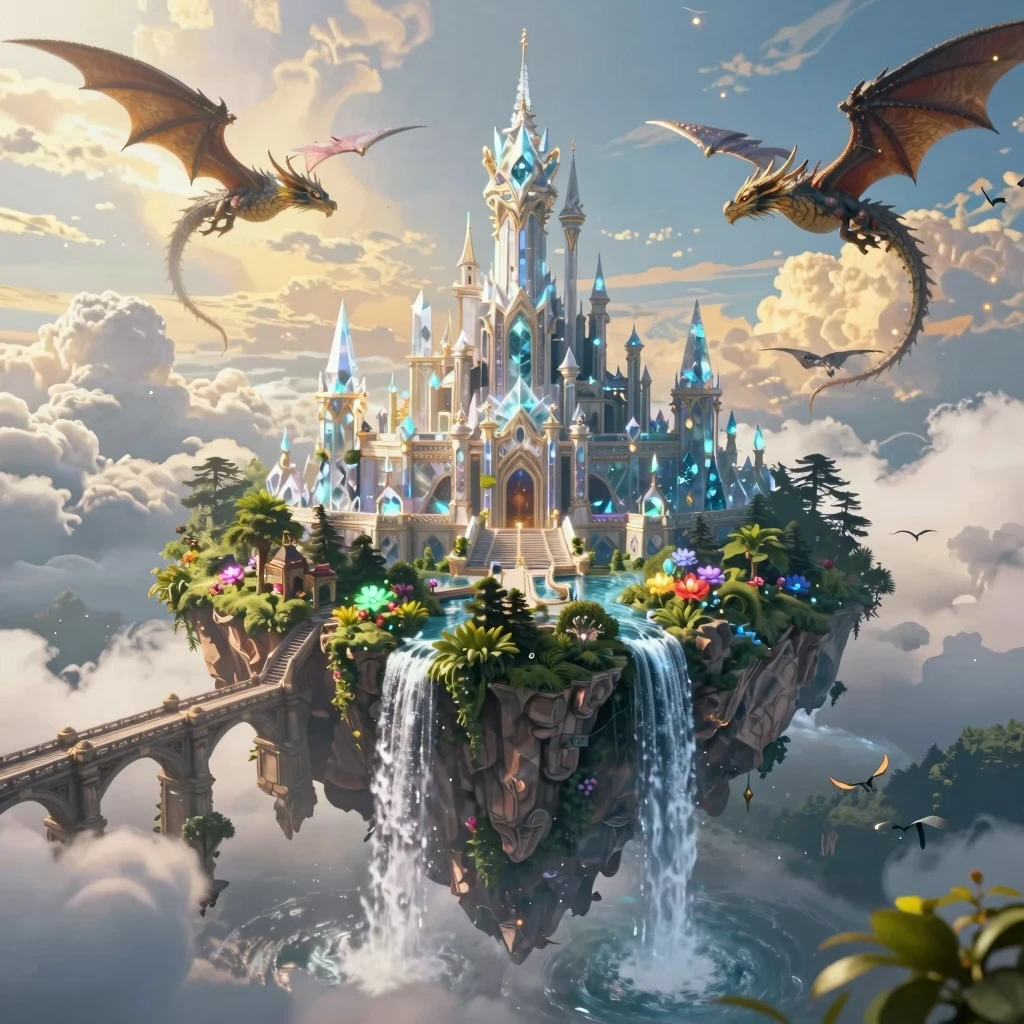
This is what came back. The image landed in about a minute, and it stuck close to the brief: a crystal castle sitting on a floating island, waterfalls spilling off the underside into open sky, forests and glowing flowers crowding the base, and two dragons banking through the clouds on either side of the towers.
For a Standard-mode run on minimum credits, the detail held up. The architecture stayed crisp and the lighting matched the golden-hour look I'd asked for. Nothing about it read as low effort, and this was the smoothest stretch of the whole session.
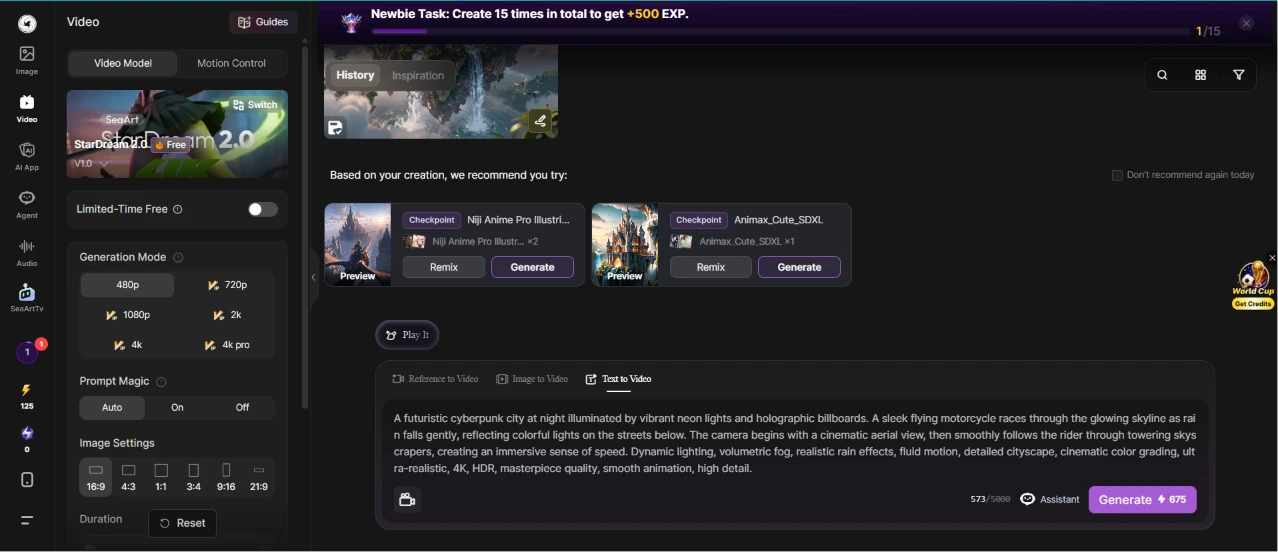
Riding that, I moved to video and kept the same cheap-as-possible setup: Standard mode, a 4:3 ratio, a 5-second clip, and one generation.
My prompt here was a cyberpunk chase:
"A futuristic cyberpunk city at night illuminated by vibrant neon lights and holographic billboards. A sleek flying motorcycle races through the glowing skyline as rain falls gently, reflecting colorful lights on the streets below. The camera begins with a cinematic aerial view, then smoothly follows the rider through towering skyscrapers, creating an immersive sense of speed. Dynamic lighting, volumetric fog, realistic rain effects, fluid motion, detailed cityscape, cinematic color grading, ultra-realistic, 4K, HDR, masterpiece quality, smooth animation, high detail."
The video panel handed me more controls than the image one had, with resolution climbing from 480p all the way to a 4K Pro option and a strip of ratios along the bottom. What I clocked right away was the cost. The Generate button now read 675 credits, a steep jump from the free image run I'd just done.
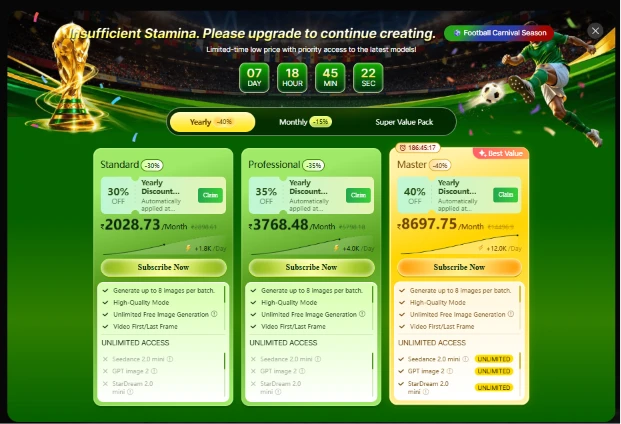
Then I clicked generate, and instead of a clip I hit a wall. A card slid up reading "Insufficient Stamina. Please upgrade to continue creating," and the screen flipped into a full pricing page.
Three subscription tiers were laid out, the entry-level Standard plan sitting around ₹2,028 a month and the top Master plan up near ₹8,697, each wrapped in its own discount badge. A countdown clock ran in the corner to hurry me along.
This was the first hard stop I hit. The image generator had let me work for free, but the video generator wouldn't budge without a paid plan, and that jump from open to locked was jarring.
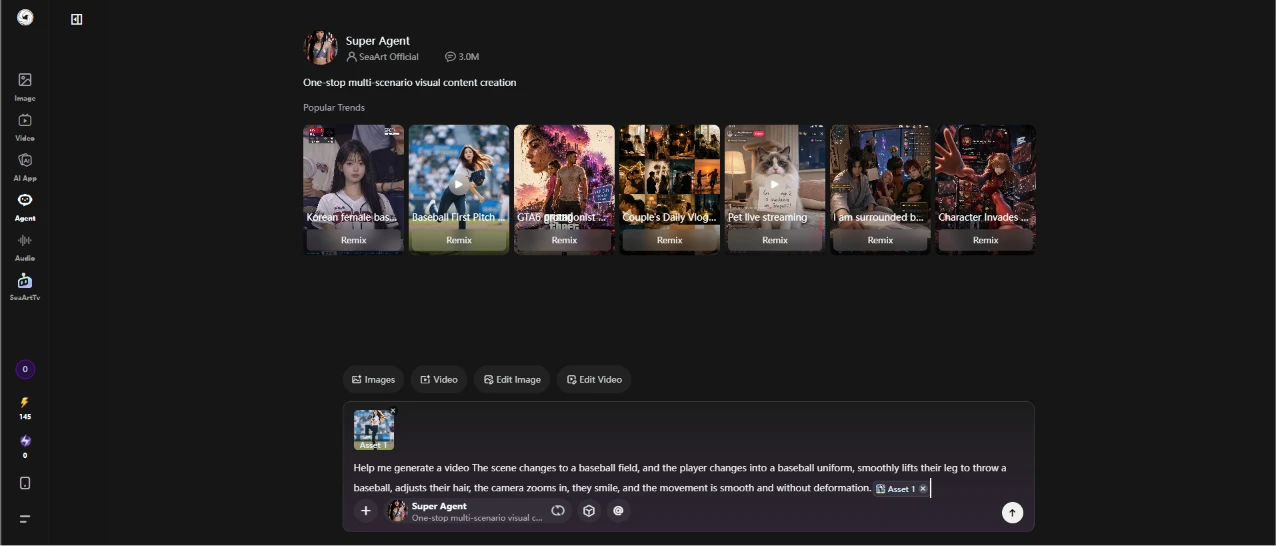
Rather than pay just to test a single video, I backed out and went to the Agent feature to see if I could reach a video another way.
I gave it a plain-language request:
"Help me generate a video. The scene changes to a baseball field, and the player changes into a baseball uniform, smoothly lifts their leg to throw a baseball, adjusts their hair, the camera zooms in, they smile, and the movement is smooth and without deformation."
The Agent dropped me into its own workspace called Super Agent, topped by a carousel of popular trends and a row of tabs for images and video alongside two editing modes. I attached an image asset, typed my request into the chat box at the bottom, and sent it. It felt more like messaging an assistant than filling out a form, a different rhythm from the panels I'd used so far.
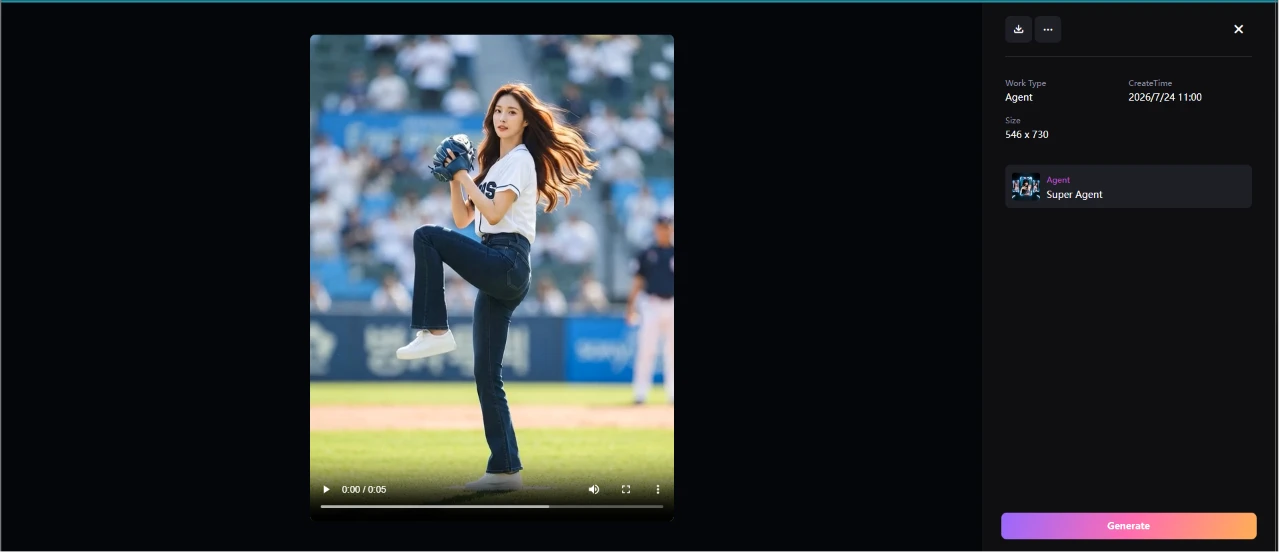
And this time a video actually came out. The Agent produced a 5-second clip of a player in a baseball uniform on a field, raising one leg into a throwing motion, right in line with what I'd typed. The panel on the right logged it as an Agent job at 546x730, stamped with the day's date.
This was the part that caught me off guard. The direct video generator had shut me out behind a paywall, yet the Agent path got me to a finished video in the same session with no upgrade screen in my way. The motion looked clean too, no obvious warping or stutter in the leg lift.
Two routes to a video, and only one of them stopped to charge me.
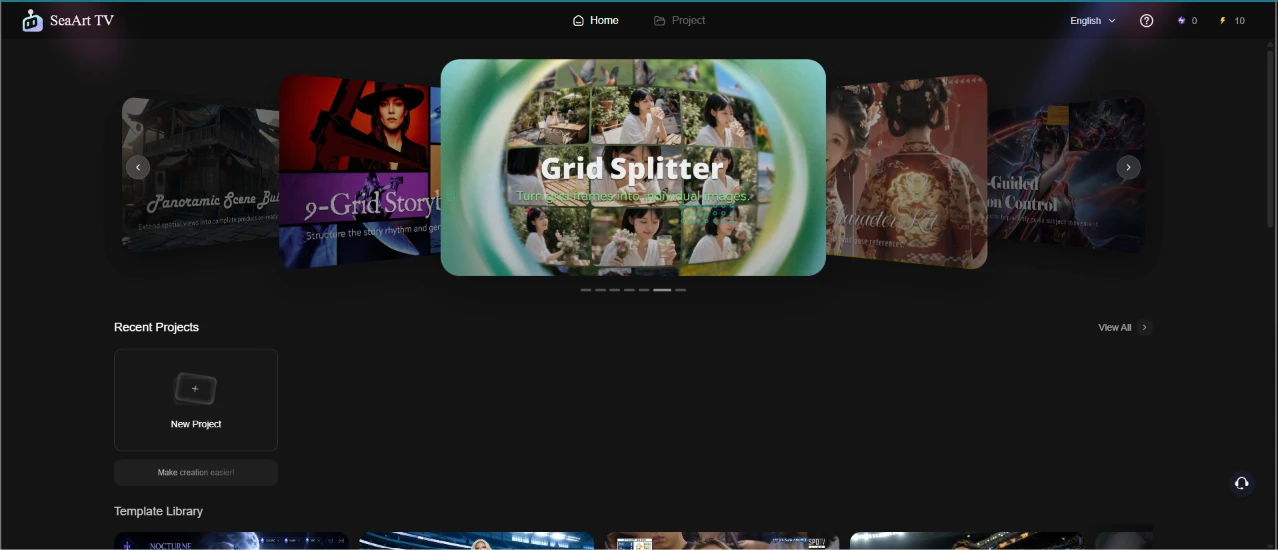
Last stop was SeaArt TV. It opened as a template-driven video workspace, with a big carousel of prebuilt styles rotating across the top, the Grid Splitter layout sitting front and center and Panoramic Scene lined up beside it.
Under the carousel were a Recent Projects strip with a New Project button and a Template Library ready to browse. This felt like the most beginner-friendly corner of the app, steering me toward ready-made formats instead of a blank prompt box. I ran out of session before building anything here, but the layout made it clear how you'd turn a handful of images into a short, styled video.
| Dimension | Our test | User signal | Verdict | Composite |
|---|---|---|---|---|
| Output Quality Accuracy, coherence, visual appeal | 9.2 | 8.7 | Excellent | |
| Ease of Use Interface clarity and navigation | 8.5 | 7 | Good | |
| Billing Transparency Clarity of pricing and renewals | 6.2 | 6.5 | Moderate | |
| Customer Support Speed and helpfulness of responses | 5.7 | 6.3 | Moderate | |
| Reliability and Stability Uptime, bugs, and outages | 8.1 | 8.9 | Excellent | |
| Content Moderation Fairness Consistency of filters and flags | 8.3 | 8.7 | Excellent | |
| Value for Money Perceived worth versus pricing | 7.3 | 6.3 | Moderate |
Toolscopia uses cookies to keep you signed in, remember your preferences, and understand how our reviews get read. Analytics are anonymous. See our privacy policy for the full detail.






Comments 0
Join the discussion and share your perspective.
Sign in to post a comment and reply to other readers.
No comments yet
Be the first to share your perspective on this tool.