1
AI watermark removal
Central feature, heavily praised for convenience but often criticized for artifacts and incomplete removal.
Vmake is an AI video and image enhancer with watermark and subtitle removal, background noise cleanup, and upscaling tools, aimed at creators who need quick, automated edits without complex software.
Independent review — we test tools ourselves and analyze public user reviews. How we test.
Vmake delivers fast, easy enhancement and watermark tools that many casual creators consider convenient and good value. However, reviews also highlight inconsistent watermark quality, slow processing, frequent billing disputes, and very difficult cancellation. Pricing and trial credits feel confusing or deceptive to several users. Best suited to experimental users who closely track billing, accept mixed results, and prioritize one‑click AI edits over precise control.
Vmake Labs, known as Vmake AI before its rebrand, is a browser-based video and image toolkit aimed at ecommerce sellers, marketers, and creators who need social content without opening an editor. It began life as a single-purpose UGC video generator, where you fed it a product photo and got a short ad back, and has since widened into a suite covering watermark removal, image and video enhancement, upscaling, background removal, translation, and auto-captions. The company behind it is Pixocial Technology, based in Singapore.
What separates it from a standalone generator is that it does not run its own model. Vmake routes your prompt to third-party engines including Seedance, Sora 2, Veo 3.1, Kling, and the Nano Banana family, with access tiered by plan. That gives you one subscription instead of five, which is the pitch. It also means you pay a markup over going direct to those models, and the value of the wrapper rests on whether the surrounding tools and the credit pricing justify the difference. That is what the testing below sets out to establish.
Central feature, heavily praised for convenience but often criticized for artifacts and incomplete removal.
Used for stripping subtitles, described as clean and fast by some, awful and unreliable by others.
Capable of impressive low quality to 4K upscales, yet sometimes outputs blurry or unstable results.
Background noise cleaner viewed as convenient and affordable for simple personal video cleanup.
Photo enhancement and image upscaling often praised for high quality and helpful results.
Credit system, including free previews, frequently described as confusing and bait like.
Plus and Pro tiers provide different features, but upgrade paths and pricing frustrate many reviewers.
Interface regularly called easy and straightforward, though some report sign in failures and site errors.
Ad video captions exist but currently limited to English, seen as restrictive for broader audiences.
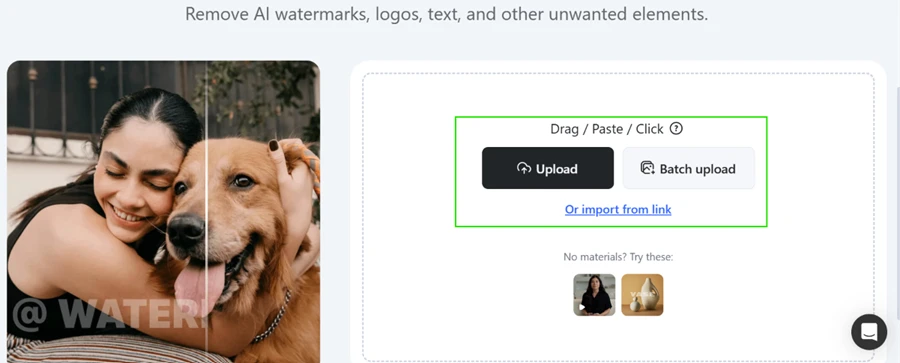
The upload screen is plain and quick to read. You drag a file in, paste one, or import from a link, and a batch upload button sits beside the single upload. Two sample files are offered if you want to try the tool without your own material.
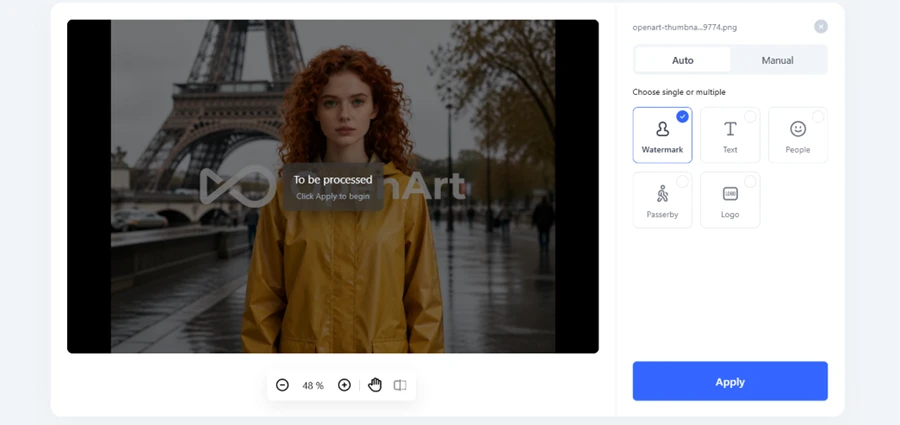
I fed it an AI-generated portrait carrying an OpenArt watermark stamped across the middle of the frame, which is a harder case than a small corner logo. After the upload, the tool asks what you want taken out. Auto mode gives five targets: Watermark, Text, People, Passerby, Logo. I ticked Watermark and hit Apply. A Manual tab is available if you would rather brush over a region yourself.
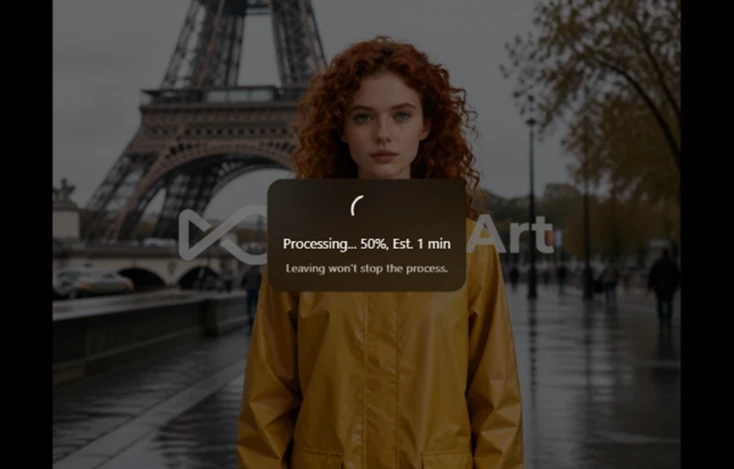
Processing a single image took about a minute.
The result was clean. Vmake detected and removed the OpenArt mark on its own, with no visible smearing across the area where the logo had been sitting, and the panel confirmed the removal.
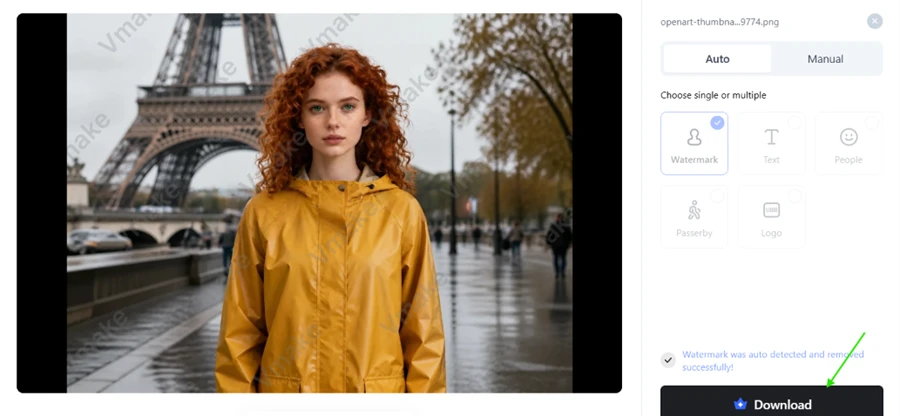
Then the catch arrives. The output preview comes back tiled with Vmake’s own watermark, and the Download button carries a paid badge. A tool built to strip watermarks hands you back a watermarked file unless you subscribe.
For the second test I used a small, soft camel photo at low resolution.

Output quality here was strong. Detail in the fur came back, the sand texture held together, and the edges avoided the plastic look that cheap upscalers leave behind. The panel offers three 4K modes on the standard tier, with 8K and 16K sitting behind a Pro badge. Content presets cover Portrait, Portrait Pro, Old photo, and Product.
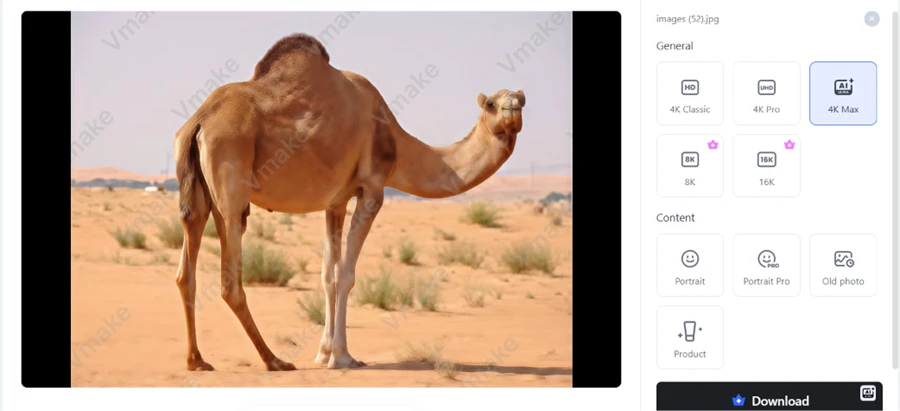
Same wall as before. The preview is watermarked and the download is paid.
Video generation is the feature the whole platform is built around, so this was the test that mattered. I uploaded a stainless steel baby feeding bottle as the product reference.

The prompt I gave it:
Create a premium 8-second product advertisement using the uploaded steel baby feeding bottle as the exact product reference. Show the bottle rotating smoothly on a clean, soft pastel background with gentle studio lighting. Highlight its wide neck, stainless-steel finish, and baby-friendly design. Add subtle light reflections, elegant camera movement, and a warm, hygienic, premium feel. Keep the bottle’s shape, color, logo, and details unchanged.
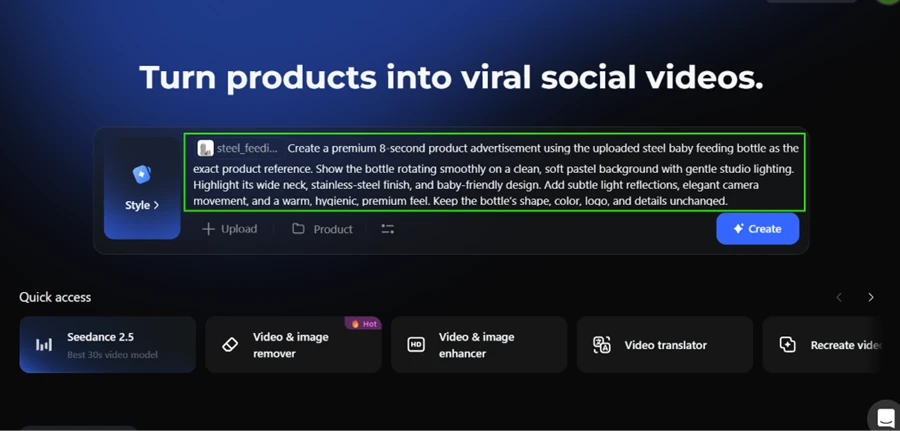
I then set the cheapest configuration the tool would allow: Seedance 2.0 at 720p, eight seconds, in a 9:16 vertical frame.
It failed, and the error message explained exactly why. The job required 320 credits. My balance was zero.
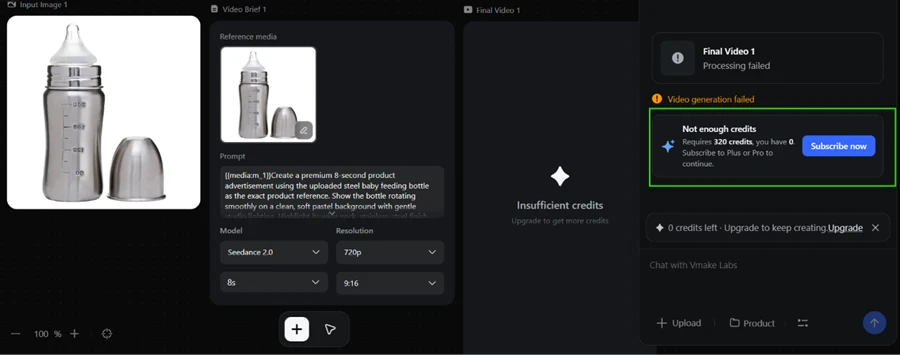
That 320-credit figure is the number everything else in this review turns on.
The pricing page advertises 20 credits daily on the free plan, valid for one day.
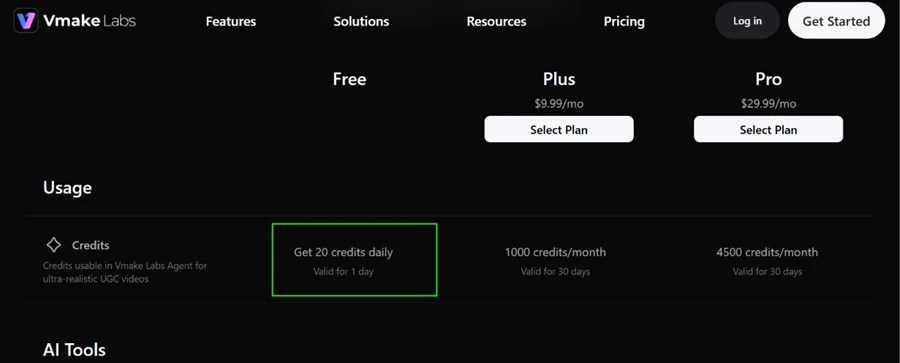
My account showed a balance of zero.
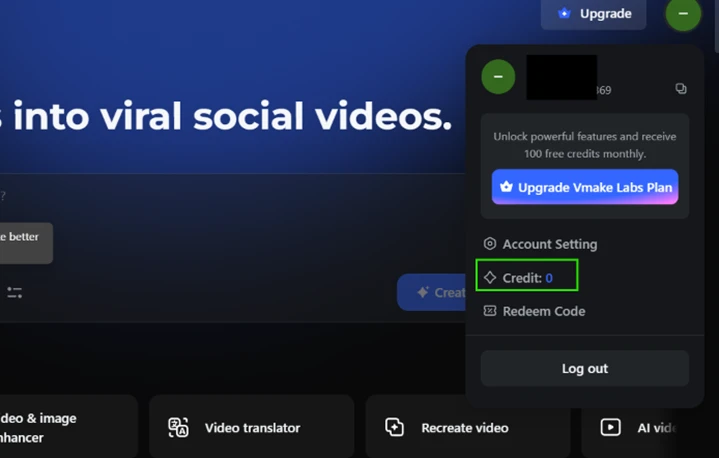
There is no daily check-in button anywhere in the interface, no task panel, and nothing to claim. The advertised credits simply never appeared.
Put the two figures side by side and the free tier stops adding up. Twenty credits a day that expire after twenty-four hours cannot be saved up toward 320. Even if the daily allowance had landed in my account exactly as advertised, a free user still could not generate one eight-second video. The ceiling is structural rather than a bug in my account.
The paid math works out like this. Plus at $9.99 per month carries 1,000 credits, which buys three eight-second clips at roughly $3.33 each. Pro at $29.99 per month carries 4,500 credits, or fourteen clips at about $2.14 each. Both numbers assume the cheapest settings I tested. A longer clip or a sharper resolution costs more than that.
Two things stayed outside this test. I did not pay for a subscription, so I cannot speak to output quality on a paid plan, and I did not put the cancellation flow through its paces, which is the complaint that comes up most often in third-party reviews of the service.
| Dimension | Our test | User signal | Verdict | Composite |
|---|---|---|---|---|
| Output Quality Visual clarity and consistency | 6 | 6.5 | Moderate | |
| Ease of Use Interface simplicity and workflow | 7.5 | 8 | Good | |
| Value for Money Perceived fairness of pricing | 5 | 5.5 | Weak | |
| Reliability Stability and processing success | 5 | 5 | Weak | |
| Customer Support Helpfulness and resolution speed | 4 | 3.5 | Weak | |
| Billing Transparency Clarity of trials and renewals | 3.5 | 3 | Weak |
Toolscopia uses cookies to keep you signed in, remember your preferences, and understand how our reviews get read. Analytics are anonymous. See our privacy policy for the full detail.






Comments 0
Join the discussion and share your perspective.
Sign in to post a comment and reply to other readers.
No comments yet
Be the first to share your perspective on this tool.