1
AI copywriting templates
Over 90 templates for blogs, reviews, social posts, and more, widely praised for speed and usefulness.
Easy Peasy AI is a multi purpose AI workspace that centralizes copywriting, chat, image and media tools for creators, students, and small teams who want faster, good quality outputs without complex setup.
Independent review — we test tools ourselves and analyze public user reviews. How we test.
Easy Peasy AI excels as an all in one AI assistant for writing, chat, and image creation, with many templates and highly praised human support. Output quality for text is consistently strong and the interface is straightforward. However, some users report billing and cancellation friction, occasional broken features, and unreliable or inappropriate image generations for specific prompts. It fits best for creators, bloggers, students, and small businesses that value speed, templates, and responsive support over perfect fine grained control.
Easy Peasy AI is a web-based platform that bundles writing, image, video, and voice generation into a single dashboard, so one subscription covers work that usually needs four separate tools. It is built for solo creators, marketers, and small business owners who need output across formats without stitching together a toolkit or learning each one.
At its center sits Marky, a chat assistant that routes your request to whichever model you pick from a shared menu spanning several providers, with an effort setting that lets you trade speed for depth on harder tasks. Around that chat live the production tools: a template library for structured copy like blog posts and product descriptions, an image generator, a brief-driven video builder with its own timeline editor, plus text-to-speech and audio transcription.
The pitch is consolidation. Rather than specializing in one thing, Easy Peasy AI covers the common content jobs a small operation faces in a week and keeps them under one login and one bill. That breadth is the reason to try it, and also the lens to judge it through.
Over 90 templates for blogs, reviews, social posts, and more, widely praised for speed and usefulness.
Conversational assistant Marky helps debug prompts and explain features, frequently highlighted as friendly and effective.
Creates artistic and pixel images, praised for watercolors yet criticized for anatomical errors in some prompts.
Supports transcription and voice cloning or text to speech, valued for podcasts and historical photo animations.
Centralizes access to different language models and tools, appreciated as an all round AI multi tool.
Interface described as clear and easy, though a few users want a more professional visual polish.
Allows saving prompts and adjusting tone, praised for matching personal voice and scenarios.
Supports students, job seekers, podcasters, and journalists, often credited with major time savings.
Support often described as quick and helpful, although a minority report refund and communication issues.
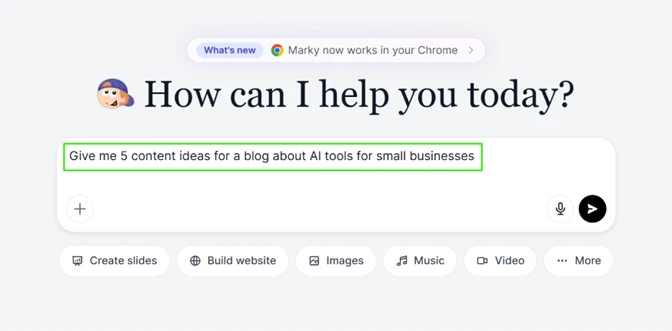
My first stop was Marky, the chat assistant on the dashboard. I typed a straightforward content request to see how it handles a real working task.
Before sending, I opened the model selector, and this was the first pleasant surprise. The free account exposes a long list of models from several providers, with GPT-6 variants, Claude Opus 5.5, Claude Fable 5.1, GLM 5.3 Flash, and a "See more 26" link sitting underneath. Each model also carries an effort control (Low, High, Max) plus a visible context size and a usage multiplier, so you can see that GLM 5.3 Flash runs at a 0.05x cost before you commit to it. Most tools hide this. Easy-Peasy puts it in front of you.
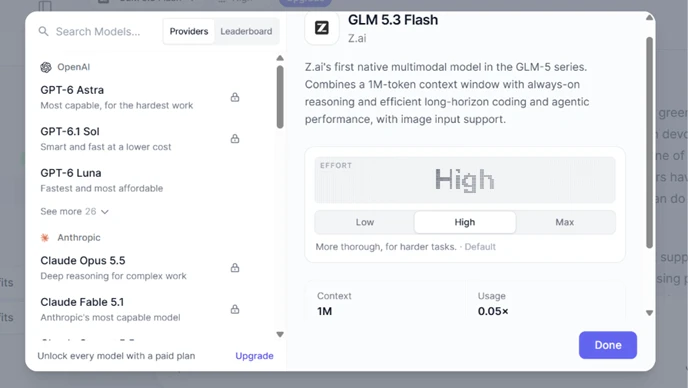
One caveat sits right inside this screen. The strongest models carry a padlock, and the footer reads "Unlock every model with a paid plan." So the breadth is real, but the best engines are gated behind a subscription on the free tier.
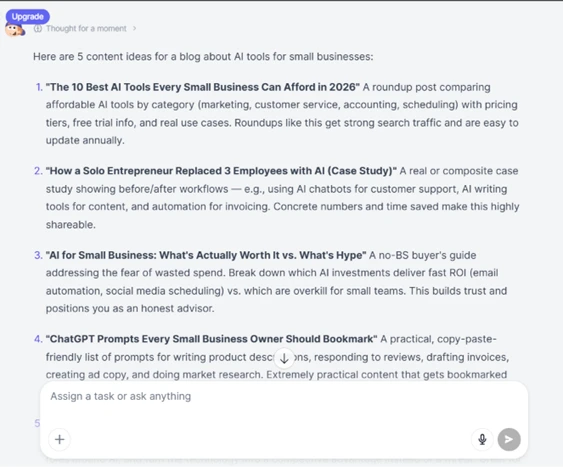
The reply itself was good. Marky returned five content ideas that were specific and usable, each with a short rationale about search traffic or shareability rather than filler. The "thought for a moment" reasoning step showed before the answer, and the output read like something I could hand to a writer and brief from directly.
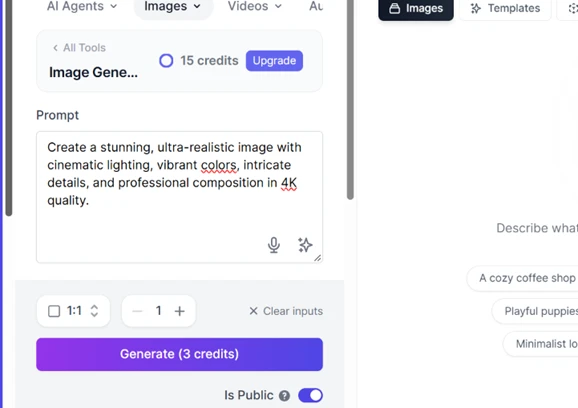
Next I moved to image generation. The tool showed 15 credits available at the top with an Upgrade button beside it. A prompt box was already filled with a default line about a stunning, ultra-realistic image, the aspect ratio was set to 1:1, and the Generate button told me the job would cost 3 credits.
Then the wall hit. On my image attempt, instead of a picture I got a full-screen "Choose your plan" popup reading "Your plan has reached its image limit." The free image allowance disappeared faster than I could produce a single usable result, and the only path forward the tool offered was to pick a paid plan.
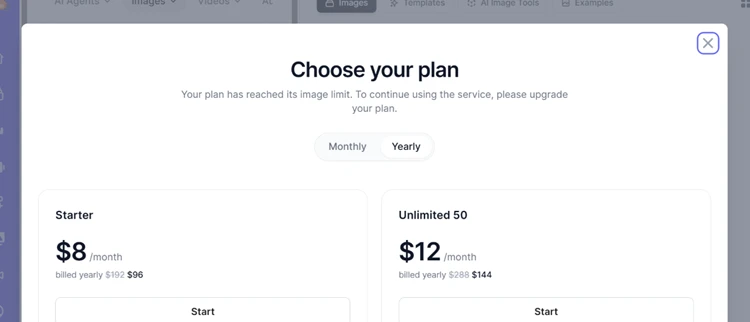
This popup also doubled as my first clear look at pricing. Starter is 8 dollars a month billed yearly at 96 dollars, down from 192. Unlimited 50 is 12 dollars a month billed yearly at 144, down from 288. Useful numbers to have, though hitting a paywall this early is a rough welcome for a new user.
I expected the video tool to be a toy. It is not.
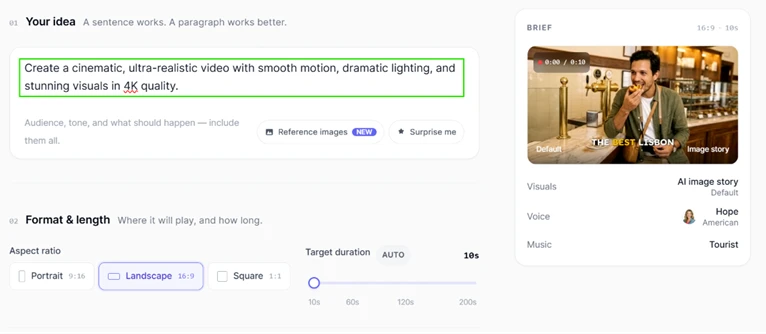
I gave it a one-line idea, set the aspect ratio to Landscape 16:9, and left the target duration at 10 seconds. On the right, a live brief card assembled itself, choosing an AI image story for visuals, a voice named Hope with an American accent, and a music track called Tourist. The tool was making production decisions from a single sentence.
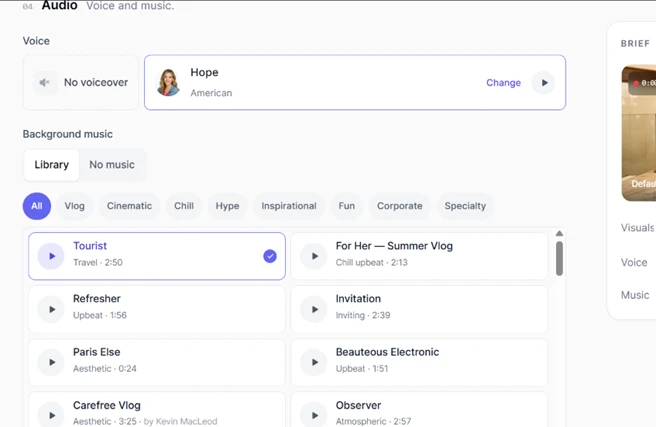
The audio step gave me real control. I could switch the voiceover on or off, swap the voice, and pick background music from a categorized library covering vlog, cinematic, chill, corporate and more, each track with a length and a preview.
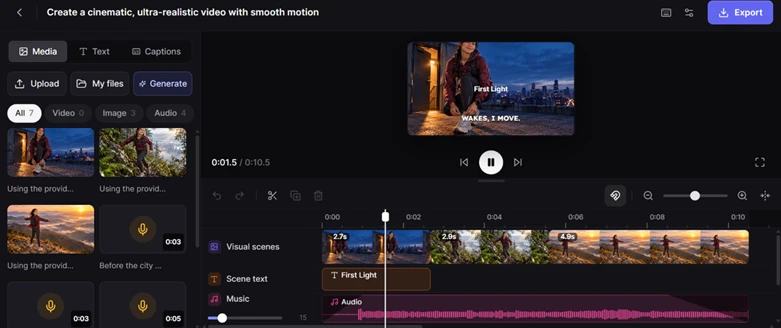
The editor it produced was the real highlight. The video opened in a proper timeline with separate tracks for visual scenes, scene text, and music. Individual clips showed their own durations, I could scrub the playhead, and the Media panel listed every generated asset. This is an actual editing surface, not a one-click black box.
Exporting is where the free plan reminds you of its limits again. The export dialog let me choose 1080p or 4K, but the fine print read "Uses 2 credits." Even finishing the video I had just built came out of the same small balance.
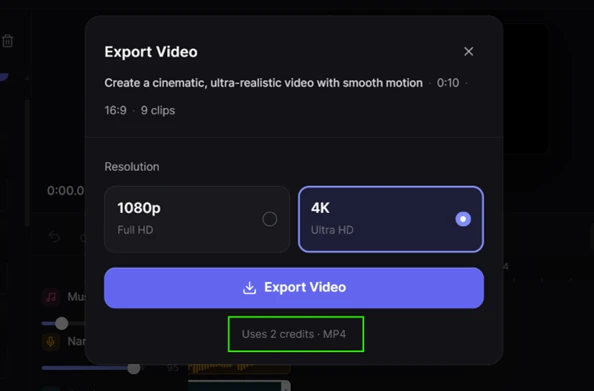
The exported file arrived with no watermark. That is worth stating plainly, because plenty of free and low-cost tiers stamp their logo across your output. Easy-Peasy did not, which makes the clips it produces genuinely usable.
After all of this, I opened my account usage for the day. One screen summed up the entire free-tier experience.
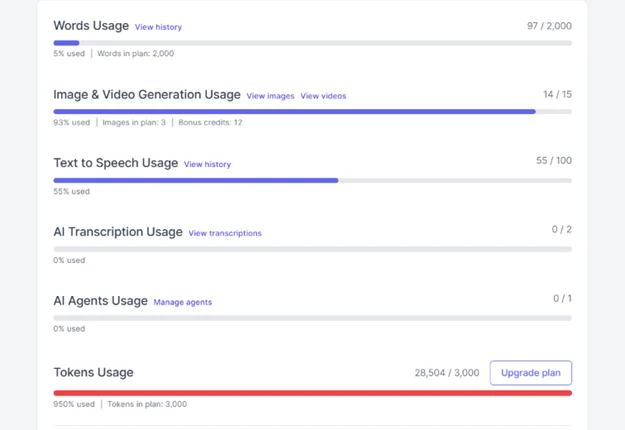
Words sat at 97 of 2,000, barely touched, so the writing templates are the most survivable part of the free plan. Image and video generation showed 14 of 15 used, confirming how little room that shared visual allowance gives you. Text to Speech read 55 of 100 even though I never opened the speech tool on its own, which lines up with the voiceover my video used. Transcription and AI Agents sat untouched at 0, so I am not reviewing those.
The number that matters most is tokens: 28,504 used against a 3,000 cap, a red bar sitting at 950 percent with an Upgrade button beside it. A single Marky conversation blew nearly ten times past the token ceiling. That is the honest definition of this free tier. It is a trial that lets you see the product work once, not a free plan you can keep using.
My verdict from the hands-on run is split cleanly. The feature depth is impressive for the money, with multi-model chat, a capable video editor, and watermark-free exports. The free allowance is thin enough that one real session of each feature exhausts it, which pushes you toward the 8 or 12 dollar plans quickly if the tool earns a place in your workflow.
| Dimension | Our test | User signal | Verdict | Composite |
|---|---|---|---|---|
| Text Output Quality Clarity and usefulness of writing | 9 | 9.5 | Excellent | |
| Image Generation Quality Accuracy and aesthetics of images | 7 | 7.5 | Good | |
| Ease of Use Learning curve and daily usability | 9 | 9.5 | Excellent | |
| Customer Support Speed and effectiveness of help | 8.5 | 9.5 | Excellent | |
| Billing and Trust Refunds, renewals, account control | 6.5 | 7 | Moderate | |
| Feature Reliability Bug frequency and stability | 7.5 | 8 | Good | |
| Value for Money Perceived benefit versus pricing | 9 | 9.5 | Excellent |
Toolscopia uses cookies to keep you signed in, remember your preferences, and understand how our reviews get read. Analytics are anonymous. See our privacy policy for the full detail.









Comments 0
Join the discussion and share your perspective.
Sign in to post a comment and reply to other readers.
No comments yet
Be the first to share your perspective on this tool.